

How to connect Power BI to an Excel file on OneDrive or SharePoint
Daniel Whittaker ·
To connect Power BI to an Excel file on OneDrive or SharePoint, copy the file's path (not its share link), delete the ?web=1 from the end, and paste it into Get data > Web in Power BI Desktop. Sign in with Organizational account. After publishing, set the credentials to OAuth2 and scheduled refresh works without a gateway.

Trying to connect Power BI to an Excel file stored in OneDrive or SharePoint causes real frustration if nobody has shown you how. The problem almost always comes down to the URL. The link in your browser's address bar and the one from Copy Link both look right, and neither works. Below are the exact steps, checked against Microsoft's documentation as of September 2026, plus what to set up once the report is published so it keeps refreshing.
How do you connect Power BI to an Excel file on OneDrive or SharePoint?
Step 1: Copy the file's path
You need the file's path, and there are two places to get it.
From desktop Excel (the classic route). Open the file in the desktop version of Excel. If it opens in the browser, use Open in Excel (or Editing > Open in Desktop App) to switch.
- Click the File tab in the top left corner.
- Select Info on the left-hand side.
- Click Copy path, near the file name. This copies the file's full URL to your clipboard.
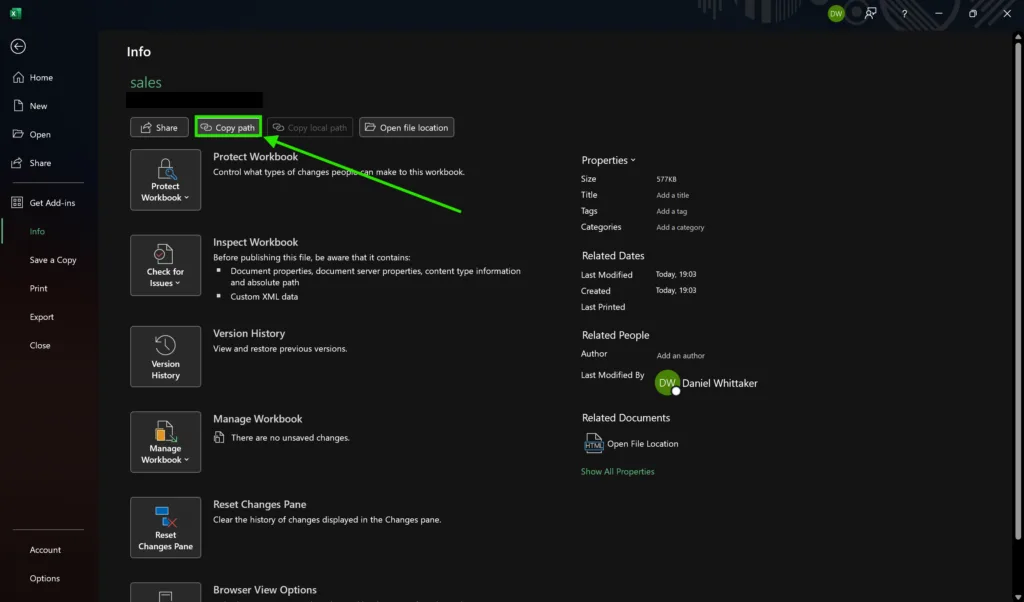
From the browser (no Excel needed). Microsoft's current Power BI guide now starts here instead. In OneDrive or the SharePoint document library, click the ellipsis (...) next to the file, choose Details, and in the details pane click the copy icon next to Path.
Either way, you end up with the same thing: a direct URL to the file rather than a sharing link.
Step 2: Clean up the URL
Paste the path into a text editor (Notepad is fine) so you can check it. A path copied from desktop Excel usually looks like this:
https://companyname.sharepoint.com/sites/sitename/Shared%20Documents/filename.xlsx?web=1
See the ?web=1 on the end? That asks for a browser preview, and it stops Power BI connecting. Microsoft's Power Query documentation says to remove it. Delete ?web=1 so the URL ends with the file name:
https://companyname.sharepoint.com/sites/sitename/Shared%20Documents/filename.xlsx
A file in your own OneDrive for work or school has a slightly different shape, something like https://companyname-my.sharepoint.com/personal/your_name_companyname_co_uk/Documents/filename.xlsx. It works in exactly the same way.
⚠️ Alert: This is the step that catches most people out. If the connection fails, check for a stray ?web=1 first.
Step 3: Connect to the file in Power BI
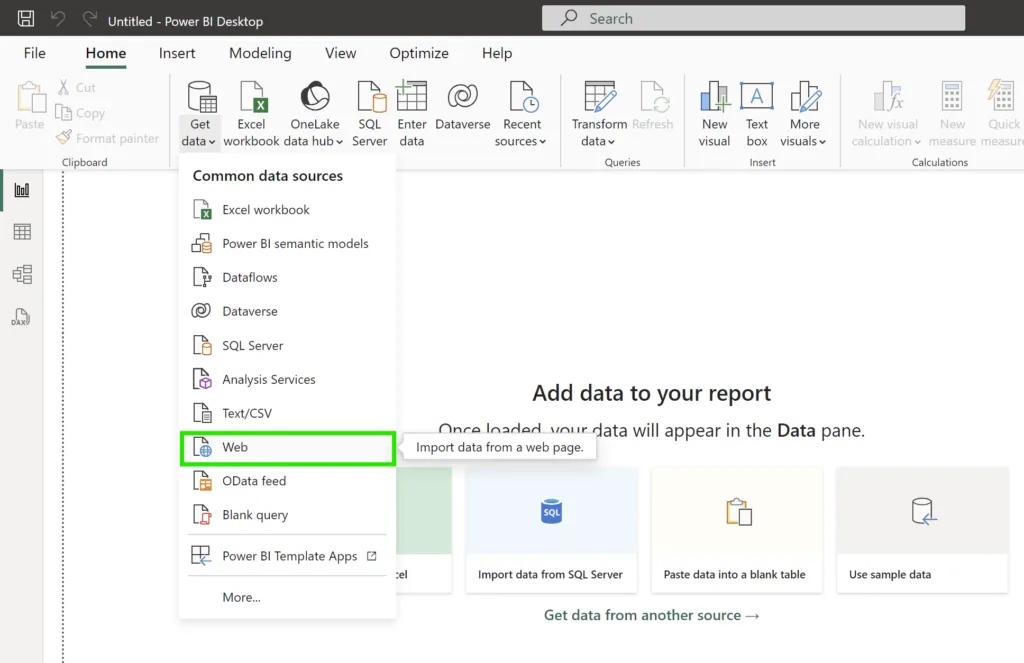
- Open Power BI Desktop and go to the Home tab.
- Click Get data.
- From the list of connectors, select Web. It feels wrong for a file in OneDrive or SharePoint, but it is the connector Microsoft documents for this.
- Leave Basic selected, paste your cleaned-up path, and click OK.
Step 4: Sign in
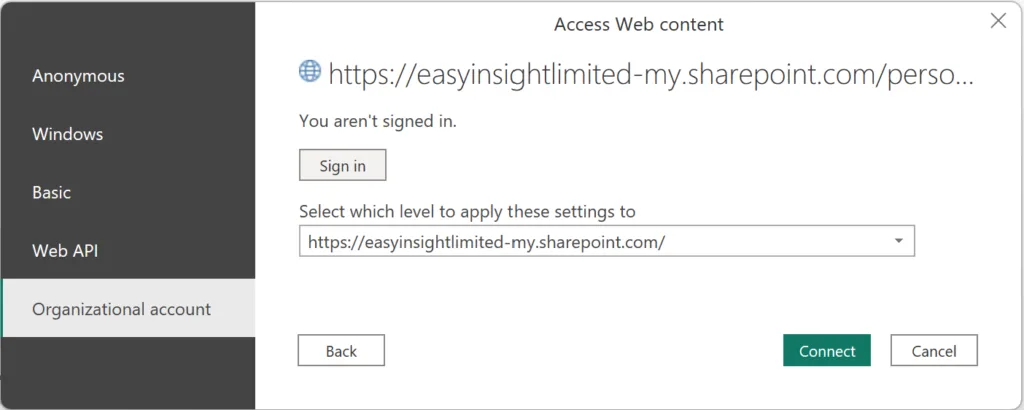
Power BI will ask you to sign in, because the file is protected by your Microsoft 365 account.
- Choose Organizational account (that is how the button is spelt in Power BI).
- Sign in with the same account you use for OneDrive or SharePoint.
- Power BI connects and reads the workbook.
On-premises SharePoint (a SharePoint server your company runs itself) is the exception: Microsoft says to choose Windows there instead.
Step 5: Load or transform the data
Power BI shows a preview of the sheets, tables and named ranges in the workbook.
- Select the data: tick the items you want.
- Transform or load: if the data needs cleaning or reshaping, click Transform Data to open Power Query. Our Power Query for beginners guide covers the common clean-ups. If it is ready, click Load.
Why doesn't the Copy Link URL work?
Copy Link (and the address bar in your browser) gives you a link built for sharing: it opens the file in Excel for the web for whoever clicks it. It may include extra parameters or tokens that mean nothing to a data connector. Copy path gives you the file's actual location, which is what Power BI needs, with only the ?web=1 to trim.
How do you keep the report refreshing after you publish it?
Getting the data into Power BI Desktop is half the job. Once you publish to the Power BI service, the report only stays current if the service can read the file on its own.
- Set the credentials to OAuth2. In the service, open the settings for the semantic model (what Power BI used to call a dataset; see what a semantic model is). Under data source credentials, edit the Web source, choose OAuth2 as the authentication method, and sign in. Microsoft warns that choosing anything else can give a Failed to update data source credentials error.
- Use the right account. For SharePoint Online, Microsoft says the credentials must be the same account you use to sign in to the Power BI service, and the file must be in the same Microsoft 365 tenant.
- Skip the gateway. Cloud sources that Power BI can reach directly don't need an on-premises data gateway, and OneDrive for work or school and SharePoint Online are cloud sources.
- Turn on scheduled refresh. As of September 2026, Microsoft lists up to 8 scheduled refreshes a day on Power BI Pro and up to 48 on Premium Per User or Premium/Fabric capacity. If you're weighing those licences, see our Power BI licensing explainer.
Why did my Power BI connection to OneDrive or SharePoint stop working?
The usual suspects, roughly in order:
- The file was moved or renamed. The path you pasted in Step 2 no longer exists. Reconnect using the new path (in Power Query, edit the Source step), or put the file back.
- Permissions changed. Your account, or the account that holds the OAuth2 credentials in the service, lost access to the file or the site.
- The schedule was switched off. Microsoft's documentation, as of September 2026, says Power BI disables a refresh schedule after four consecutive failures, including invalid or expired credentials. It also pauses scheduled refresh after two months in which nobody has visited a report or dashboard built on the model. Either way the owner gets an email; re-enable the schedule in the semantic model settings once you've fixed the cause.
- A column or sheet was renamed. If someone renames a column or table the model depends on, service refresh fails until the report is fixed in Desktop and republished.
What else makes this setup reliable?
- Agree where the file lives. A workbook in a SharePoint team site outlives any one person. A file in someone's personal OneDrive goes with them when they leave.
- Use Excel tables or named ranges. Formatting the data as an Excel table (Ctrl + T) gives Power BI a clean, named block to read. It keeps working when rows are added, and it doesn't break when someone types notes in the next column.
- Keep the file shape stable. Adding rows is fine. Renaming columns, sheets or tables is what breaks refresh.
- Know when you've outgrown the spreadsheet. If several people edit the file and the report now matters to decisions, that is usually the point to move the data into something sturdier. Our data services cover that step.
Is there another way to connect, such as the SharePoint folder connector?
Yes. Power BI's SharePoint folder connector reads every file in a document library. It suits a folder of monthly exports that you want to combine into one table. For a single named workbook, the Web connector and a file path is simpler and is the route Microsoft documents for this job. Our guide to connecting Power BI to different data sources covers the wider set.
Sources, checked September 2026: Microsoft Learn, Use OneDrive for work or school links in Power BI Desktop; SharePoint and OneDrive for work or school files import; Configure scheduled refresh; Data refresh in Power BI; Troubleshoot refresh scenarios.
Frequently asked questions
Why doesn't the "Copy Link" URL from OneDrive or SharePoint work in Power BI?
Because sharing links are built for people opening the file in a browser, not for a data connection. Use the file's path instead: Copy path from File > Info in desktop Excel, or the copy icon next to Path in the OneDrive or SharePoint Details pane.
What do I remove from the copied path?
The ?web=1 on the end, if it is there. It asks for a browser preview, and Microsoft's own instructions say to remove it so Power Query can reach the file. The cleaned-up URL ends with the file name, for example filename.xlsx.
Which Power BI connector should I use for a OneDrive or SharePoint file?
The Web connector under Get data, with the Basic option, even though the file lives in OneDrive or SharePoint. Paste the cleaned-up path and sign in with Organizational account for Microsoft 365 or OneDrive for work or school.
Do I need a gateway to schedule refresh from a OneDrive or SharePoint file?
No. OneDrive for work or school and SharePoint Online are cloud sources, so the Power BI service can reach them directly. In the semantic model's settings, set the data source credentials to OAuth2 and sign in with the same account you use for the Power BI service.
Why did my connection stop working?
Usually the file was moved or renamed, which changes its path, or the account lost access. In the Power BI service, a schedule is also switched off after four consecutive failures, including expired credentials, and paused after two months in which nobody opens a report built on it.
Easy Insight is a UK consultancy for AI, web, apps and data — senior specialists only, no juniors.
About the author
Daniel Whittaker · Senior Business Intelligence Consultant
Daniel Whittaker is a Senior Business Intelligence Consultant at Easy Insight, based in Fareham, Hampshire, and has worked with Power BI since 2015. He leads end-to-end BI projects for clients across the UK — from data modelling and governance through to dashboard design — and trains client teams to run their own reporting on Power BI and the wider Microsoft data stack.
Next step
Want a number before you talk to anyone?
The free Power BI & Fabric Pricing Estimator gives you a first-pass licensing cost in two minutes, and it doesn't ask for an email. When you're ready, a free data review is one call with the consultant who would deliver it; EasyStart Power BI builds are fixed from £4,950.